
QR Ordering System
Table QR Ordering for UK Restaurants
Guests in a UK dining room scan the table QR, open the menu in the browser, and order without downloading an app.
With a QR menu ordering system you can offer a free digital menu, then add QR Menu + Order or QR Menu + Order + Payment as needed.
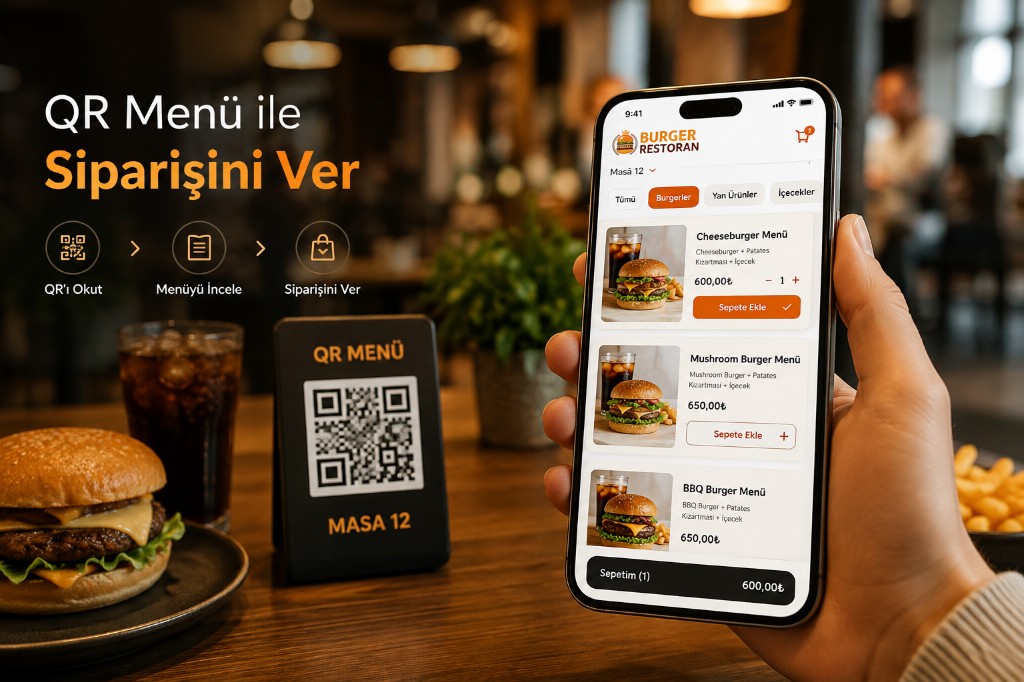
QR Menu Ordering System Menu, Order, and Payment in One Flow
Match your table ordering system needs with three QR Menu levels.
Show Menu → Take Orders → Take Payment
QR Menu
ViewingGuests scan the table QR code and view your digital menu.
- QR code
- Digital menu
- Product photos
- Product descriptions
- Prices
- Allergen info
- Multilingual menu
- Instant menu updates
QR Menu + Order
Table orderGuests order from the QR menu: they pick items, add them to the cart, and send the order from the table.
- Digital menu
- Items & options
- Cart
- Order note
- Table-based orders
- Order panel
- Kitchen display
QR Menu + Order + Payment
Full flowAdd online payment to the QR Menu and order flow. From table ordering system to payment in one flow.
The guest:
- Scans the QR code
- Views the menu
- Selects items
- Places the order
- Pays online
Manage Tables with QR Codes for Your Table Ordering System
Assign a QR code per table so your table ordering system tracks where orders come from.
Create separate QR sets for different areas:
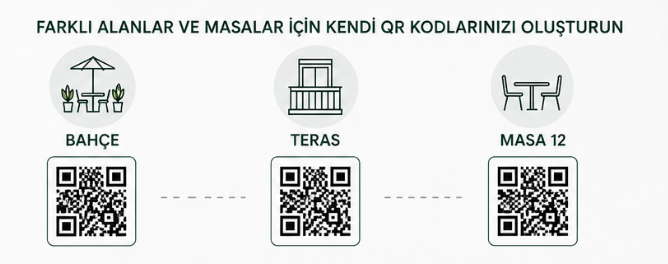
- Dining room
- Terrace
- Garden
- Bar
- VIP area
- Event area
With QR Menu + Order, when guests order from the QR menu, table info travels with the order into the panel.
Start with Free QR Menu
Place QR codes on tables so guests can view:
- Your current menu
- Product photos
- Prices
- Product descriptions
- Allergen info
- Menu categories
on their phones.
When the menu changes, you do not need a reprint.
Update in the panel and publish instantly on QR Menu.
Later you can move to QR Menu + Order or QR Menu + Order + Payment.
QR Menu
ViewingGuests scan the table QR code and view your digital menu.
- QR code
- Digital menu
- Product photos
- Product descriptions
- Prices
- Allergen info
- Multilingual menu
- Instant menu updates
Guests view the menu and place orders with staff.
Contactless Table Ordering Without an App
- QR Code
- Menu
- Order
- Payment
This contactless ordering system runs in the mobile browser.
Your guest does not need to:
- Open the App Store
- Download from Google Play
- Create an account
to view the menu or place orders with a QR code.
A phone camera is enough.
QR Code Menu
Take Table Orders
Do not stop at menu viewing — let guests order from the QR menu.
With QR Menu + Order, guests:
- Scan the QR code.
- Open the menu.
- Pick an item.
- Set options.
- Build a cart.
- Send the order from the table.
Orders go straight to the restaurant panel and kitchen display.
Close to waiterless ordering: guests create orders without staff re-entering them.
QR Code Menu
Take Table Payments
Businesses that want online payment can run QR Menu + Order + Payment on the QR menu ordering system.
At the table, the guest:
- Views the menu
- Creates the order
- Sends the order
- Pays online
Payment rails follow the integrations you choose. Details: payment integrations.
Current Menu, Current Prices
Printed menu changes often mean reprints.
With QR Menu, management happens in the panel. Run the catalog from online menu.
- Add a new product.
- Change a price.
- Take an item offline.
- Change a photo.
- Update a description.
- Set a promo price.
Changes can publish instantly on the digital menu.
That makes QR Menu practical for restaurants that change prices or items often.
What a Waiterless Ordering System Gives Your Restaurant

Contactless ordering, no app
In a contactless ordering system guests place a QR order without installing any app.
From table order to kitchen
After ordering via QR code, orders reach the kitchen directly in your restaurant QR ordering system for faster prep and service.

Online payment in QR ordering
With QR order and payment, guests can also pay at the table from their phones.

Full bill or bill splitting
With table payment guests see the table total and can pay in full or separately.

Digital menu with QR Menu
In the standard mode of a QR menu ordering system you can offer a digital menu only.

Always-ready QR menu
A QR ordering system needs no extra devices or constant reprinting of paper menus.

Passcode-secured ordering
A passcode on QR menu ordering helps prevent fraudulent orders.
Frequently Asked Questions
How do I take table orders with a QR ordering system?
A QR ordering system lets guests scan the table QR code, open the menu, and place table orders. Start with free QR Menu, then add ordering — see the usage levels above for the flow.
How does ordering with a QR code work?
Guests scan the QR code, pick items, add them to the cart, and send the order. Ordering via QR completes in the mobile browser — no app download.
Can each table have its own QR code for orders?
Yes. In a table ordering system each table gets its own QR code; the table-order flow sends the order to your panel with table info.
Can guests set options, notes, and cart when ordering from the QR menu?
Yes. In a QR menu ordering system guests order from the QR menu with product options, order notes, and cart edits.
How do orders reach restaurant screens in a restaurant QR ordering system?
Orders land in the restaurant panel and can go to the kitchen display or printer flow. Order tracking continues on the business side.
Can guests order without waiting for a waiter — contactless?
Yes. In a contactless ordering system guests order from their own phone. Staff do not re-enter the order; they focus on prep and service — close to a waiterless ordering system.
What payment options exist in QR ordering?
With QR Menu + Order + Payment, table payment uses only methods you enable and that are supported. See payment integrations.
What are QR ordering system prices?
Standard QR Menu is free. Ordering and payment levels open as needed; see current packages on the QR ordering system pricing page.
Start with Free QR Menu
You do not need the ordering module just to digitize your menu.
QR Menu is free.
When you need them:
- QR Menu + Order
- QR Menu + Order + Payment
to digitize ordering from the QR menu, table ordering, and payment.